How to find a guidance robot in a Tokyo station (and what to do when there isn’t one)
Where AI concierge and guide robots have appeared in Tokyo’s stations, how to ask one for directions with kids — and the reliable human fallback for when the robot has moved on.
Tokyo’s stations are famously vast, and a few of them have trialled something children find genuinely thrilling: an AI “concierge” or guide robot that you can walk up to and ask for directions. For a tired kid who’s just been told to walk down yet another corridor, being pointed the right way by a talking robot can turn a low moment into the story of the day.
Two honest things to know before you go hunting for one. First, these are showcases and pilots, not permanent station furniture — they get introduced for an event or a “smart station” trial, moved, paused for maintenance, or quietly retired. So treat a robot as a lovely bonus, never as your navigation plan. Second, where they do run, they’re there to help: multilingual directions, transfer advice and nearby-area tips. Below is where they’ve appeared, how to use one with kids, and — most importantly — the human fallback that always works.
What these station robots actually do
The useful ones are information robots, not ticket machines. You approach, greet the robot (a tap on the screen or a spoken “hello” usually wakes it), and ask a simple question: which exit for a landmark, where the lifts or toilets are, how to transfer to another line, or what’s worth seeing nearby. They answer with voice plus a screen map or arrows, which is perfect when a word gets lost in a busy concourse.
They handle short, clear questions best. “Where is the Yamanote Line?” or “Where is exit A2?” works far better than a rambling sentence — which, happily, is also exactly how you’d coach a child to ask.
Where you’ll find them (when they’re running)
These three are the ones consistently reported by the operators and Tokyo’s city government. You may also stumble on robots elsewhere — hotels, airports (Haneda and Narita have used guidance and cleaning robots), and department stores — but the station examples above are the ones worth seeking out.
- Takanawa Gateway Station (JR East, Yamanote Line) — the flagship “smart station”, opened in 2020 as a showcase for new technology. It has trialled AI-based passenger-guidance robots and large digital signage, with voice and on-screen guidance reported in four languages (Japanese, English, Chinese and Korean). It’s the most likely place to meet a guide robot, but because it began as a trial, don’t assume the robot is on duty on any given day.
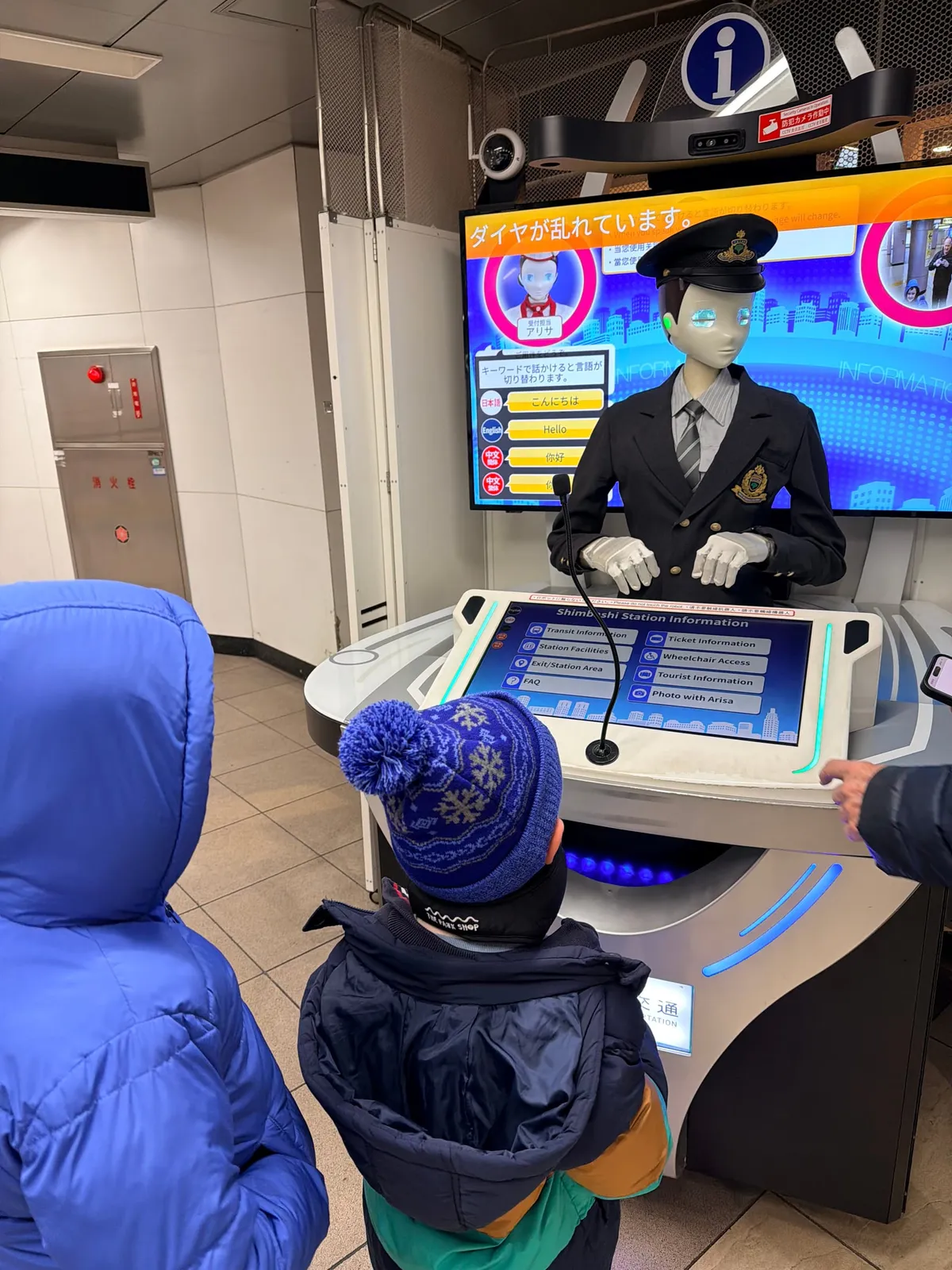
- Shimbashi Station (Toei Asakusa Line) — home to an AI robot concierge (nicknamed “Sota”) introduced around 2020 ahead of the Tokyo Games. It makes small talk and gives station and local guidance through voice interaction, in Japanese, English and Chinese.
- Shinjuku-Nishiguchi Station (Toei Oedo Line) — a companion deployment (nicknamed “Arisa”), a humanoid concierge offering the same multilingual guidance with human-like gestures.
How to use one with kids
- Let the child ask. Coach a short question first (“Where is the Ginza Line?”) — robots parse simple phrasing best, and the child gets the win.
- Pick English on the screen if the robot doesn’t detect it. Most offer a language button.
- Keep expectations light. It may mishear a name or not know a very specific shop — that’s normal. Treat a wrong answer as part of the fun, then check with a person.
- Mind the flow. These sit in busy concourses; step to the side so you’re not blocking commuters while the kids have their turn.
- Grab the photo, then move. It’s a great trip memory — take it and clear the space.
The fallback that always works
Because a robot might not be there, build your navigation on things that are. Every staffed station has a ticket-window or gate office with staff who will point you the right way — the universal move is to show them your destination written down or on your phone. Station signage in central Tokyo is bilingual, exits are numbered, and the coloured line letters-and-numbers system (e.g. G for Ginza, exit A2) makes directions easy to give and follow.
For door-to-door confidence, a maps app with live train times does the job a robot can’t: Google Maps and Japan-specific apps like Navitime give platform-level, step-by-step transfers. Load everyone onto an IC card (Suica/PASMO/ICOCA, or a mobile Suica) so gates are tap-through, and screenshot your route before you head underground where signal can drop. Our getting-around guide has the full, kid-tested version of this.
While you’re in the station: collect a stamp
Robot or not, give the kids one more reason to love the metro: “eki stamps” (駅スタンプ). Most Tokyo Metro stations — and many JR and Toei ones — have their own free, unique inked stamp near the ticket gates or station office, showing a local landmark. Pack a small notebook and let children collect one at each station; it turns every transfer into a mini treasure hunt and sends them home with a hand-stamped record of the trip. Ask staff if you can’t find where it lives.
So: hunt for a robot at Takanawa Gateway, Shimbashi or Shinjuku-Nishiguchi for the novelty — it’s a small, delightful bit of Tokyo that kids love — but keep a written destination, a maps app and the station staff window as your real safety net. That combination gets your family pointed in the right direction every time, robot or no robot.
Book ahead for this trip
Optional, relevant experiences you can pre-book on Klook. We may earn a commission — it never changes what we recommend.
Japan Rail Pass
Confirm current price and whether it suits your route.
Haneda Airport transfer
Welcome Suica / ICOCA IC card
Some links are affiliate links. If you book through them we may earn a commission at no extra cost to you — it never changes what we recommend.
Turn this into your itinerary
The planner builds a personalised, day-by-day version around your family.
Start planning →Common questions
- Is there definitely a robot at these stations right now?
- Not guaranteed. Tokyo’s station robots are pilots and showcases that get moved, paused or retired without much notice. Takanawa Gateway, Shimbashi and Shinjuku-Nishiguchi are the stations where they’ve been reported, but treat meeting one as a bonus and keep station staff and a maps app as your reliable backup.
- What languages do the robots speak?
- It varies by robot. The Takanawa Gateway guidance system has been reported to cover Japanese, English, Chinese and Korean; the Toei concierge robots at Shimbashi and Shinjuku-Nishiguchi handle Japanese, English and Chinese. If it starts in Japanese, look for a language button on the screen.
- Can the robot actually help me transfer lines?
- Yes — giving transfer directions, exits and nearby-area tips is exactly what they’re for. Ask a short, specific question (“Where is the Oedo Line?”). For live train times and platform-level steps, a maps app is still more dependable.
- Are the robots free to use?
- Yes. They’re public information robots inside the station — there’s no charge to walk up and ask for directions.
Related guides
Keep reading
Getting around Japan with kids: the basics
Trains, IC cards, the Shinkansen, luggage forwarding and prams — a plain-English starter guide to moving around Japan with children and bags.
5 min readTrain etiquette with kids in Japan
How to ride Japanese trains politely with children — noise and phones, priority seats, prams, queueing, and where eating is and isn’t okay.
10 min readLuggage forwarding in Japan: the complete family guide (takkyubin)
How Australian families use takkyubin to travel Japan hands-free — airport-to-hotel, hotel-to-hotel and to ski resorts. Carriers, costs, lead times, the shipping form, and what to do at an unstaffed apartment. Verified against official carrier sources.
7 min readTrains for kids in Tokyo: museums, front seats & a first Shinkansen
Railway museums, driverless front-row seats, the Yamanote loop, Shinkansen spotting and easy bullet-train day trips — a train-lover's Tokyo, family-tested.